반응형
Git Bash 내 명령어
ls -al 현재 프로그램이 어떠한 폴더를 바라보고 있는지
cd change directory ex) cd Desktop
mkdir make directory
touch 파일생성 ex) touch README.md
cd .. 뒤로가기
rm -rf 폴더삭제
Git Hub 연결
git init git 연결준비
git remote add origin https://github.com/lee-h-i/web-study.git git 연결
git add . 파일을 업로드 할 준비
git commit -m '@@' 코드저장소에 파일을 올릴 때 같이 보낼 메시지 입력
git push origin master master Branch 이름으로 코드를 날릴 준비
git clone https://github.com/lee-h-i/web-study.git git의 코드를 내려받음
* git add. -> git commit -m '메세지' -> git push origin master 는 순차적으로 진행해주어야함
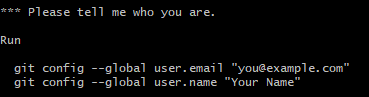
git please tell me who you are 오류해결법 git please tell me who you are 오류
git config user.name "사용자 이름 입력"
git config user.email "이메일@도메인.com"
반응형